
How To Scan Both Sides Of A Coin For Better Identification
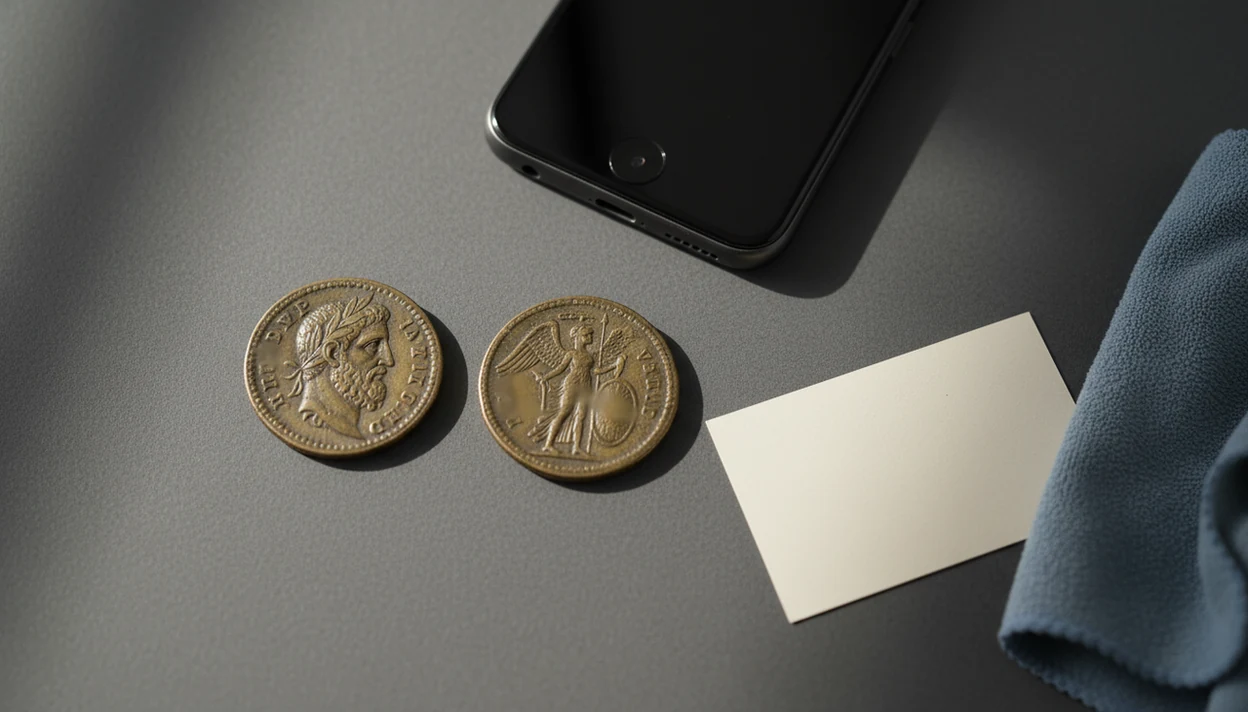


To get better matches, how to scan both sides of a coin means capturing sharp, well-lit photos of the obverse and reverse before submitting them for identification. Two-sided images help confirm date, mint mark, country, denomination, reverse type, and condition clues that one side can miss.
Definition: Scanning both sides of a coin means photographing the obverse and reverse clearly enough for a human reviewer or AI tool to compare the full design, lettering, date, mint mark, and condition details.
- Always scan the obverse and reverse because one side alone can create false matches.
- Use steady lighting, sharp focus, and a plain background so dates, mint marks, legends, and reverse details stay readable.
- Treat AI value estimates as useful context, not professional grading, especially for rare, damaged, or high-value coins.
What It Means To Scan Coin Obverse Reverse Images
Scanning coin obverse reverse images means taking one clear photo of the front side and one clear photo of the back side before identification. The obverse is usually the main portrait or front design, but that convention can vary by country, ruler, and series.
Each side carries different evidence. One may show the portrait, date, mint mark, or legend. The other may show the denomination, country name, reverse design, or type variety. A beginner turning over a wheat cent under a kitchen light may find the tiny mint mark only after checking the date area closely.
A photo-based coin app can fit into this workflow by identifying coins from photos, showing rarity and grade hints, and helping beginners estimate value. Still, two-sided scanning is a practical identification step, not a formal appraisal or certified grade.
Why Two Coin Photo Sides Reduce False Matches
Two coin photo sides reduce false matches because the app has more design evidence to compare. A single portrait, shield, wreath, eagle, monarch, or date style can appear on many related coins.
- AI coin tools compare visible features against image catalogs and reference data, including design layout, lettering, date, and denomination.
- One-sided photos can confuse similar rulers, dates, countries, commemoratives, denominations, and reverse varieties.
- The U.S. Mint has produced more than 1 trillion circulation coins since 1792, so many designs have close relatives.
- In 2024 alone, the U.S. Mint produced over 11.4 billion circulating coins, which adds many visually similar modern examples.
- For common U.S. pocket change, a reverse photo often separates a normal circulation find from a state quarter, commemorative, or variety worth a closer look.
A good photo-first coin identifier and value estimation app for collectors and beginners delivers likely matches and research context, not guaranteed rare-coin status or a professional appraisal.
How Two-Sided Coin Photo Matching Works
Two-sided coin photo matching works by reading visual signals from both images, then combining them into a likely match. The software checks design layout, legends, date position, mint mark area, denomination, wear, scratches, toning, and visible damage.
The simple flow is: upload both images, detect the coin area, compare features, combine both-side evidence, then return likely matches with rarity and value context. In image-matching terms, the app is comparing visual features and image embeddings. In plain English, it checks whether the shapes and lettering resemble known coin references.
A reverse photo can confirm what the obverse only suggests. That matters when a front design appears across several denominations or countries. For a broader look at the matching process, the guide to what happens when you scan a coin explains the scan-to-result sequence.
Not certainty. Better evidence.
Before You Scan A Coin Obverse Reverse Pair
“What should I do before I scan a coin obverse reverse pair?” Set the coin on a clean, flat, neutral background and use soft indirect light from two sides if possible. A gray card, white paper, or matte table works better than a shiny counter.
Remove a distracting holder only when it is safe. If the coin is in a sealed slab, leave it there. If it is in a cardboard 2x2 flip, you can wipe dust from the flip, but don’t clean the coin itself to improve a photo. Cleaning can leave hairlines and reduce collectible value.
Wipe the phone lens, hold the phone steady, and keep the coin flat. A small tripod helps, but two elbows on the table works fine. Smartphone photos are practical for most beginners; Pew Research Center found that 76% of U.S. adults owned a smartphone in 2015, and ownership rose further in later years.
How To Use Coin Photo Sides For Better App Results
Use coin photo sides as a paired record, not as two random snapshots. For beginners, front-and-back photos usually work better than typing a vague description because the app can compare visible design clues directly.
- Set the coin on a plain surface with the coin flat and the background free of patterned clutter.
- Photograph the obverse so the coin fills most of the frame without cutting off the rim.
- Flip the coin carefully by lifting it, not dragging it across the surface.
- Photograph the reverse with the same lighting, distance, and scale used for the obverse.
- Review both photos by zooming in on the date, mint mark, legends, and rim.
- Save or submit both images together so the result can compare the full coin.
For phone-specific setup, our guide on how to identify coins with phone covers camera handling in more detail.
Step 1: Capture A Sharp Obverse Coin Photo
A sharp obverse coin photo should show the main front design, date area, and lettering without tilt or blur. Center the coin, then keep the camera parallel to the coin surface so the rim stays evenly round.
Tap to focus on the most useful feature. On many U.S. coins, that may be the date, portrait, central device, or motto. On older world coins, the ruler’s name or legend may matter more than the portrait itself. If a mint mark appears on the obverse, make sure it is readable before moving on.
Avoid digital zoom when it creates grain or blur. Move the phone closer instead, then back up slightly if the edge starts to crop. A fingernail pointing at a doubled number can help you remember the spot, but take the identification photo without the finger in frame.
Readable dates prevent many bad matches.
Step 2: Take A Coin Reverse Photo With Full Detail
A coin reverse photo can confirm denomination, country, reverse design, branch mint clues, and variety details. Some coins look ordinary from the front but separate into different types only after the reverse is checked.
Flip the coin by lifting it from the edge. Do not drag it across paper, wood, or cloth, especially if the coin may be uncirculated or prooflike. Keep the lighting and scale consistent with the obverse image. If the obverse filled most of the frame, the reverse should too.
Reverse details often connect directly to rarity and value context. A different eagle, wreath, mint mark style, privy mark, or commemorative design can change the lookup path. For older pieces or unfamiliar countries, an app that identifies old coins may still need clear legends on both sides before it can narrow the result.
Step 3: Review Both Coin Photo Sides Before Upload
Review both coin photo sides before upload by zooming in on the finished images. Check the date, mint mark, lettering, central design, rim, and any damaged area that could affect condition notes.
Glare, shadow, motion blur, cropped rims, and low resolution can all cause misreads. Flash reflection on a prooflike surface may erase the exact detail you wanted to show. Dark wooden tables can also make copper cents look redder than they are, which may distort condition impressions.
Retake both images if one side is much darker, blurrier, smaller, or more angled than the other. Matched photos are easier to compare. They also help collection apps track the same physical coin over time because the saved record has a consistent front-and-back view.
Same coin. Same setup.
Common Coin Scanning Mistakes That Hurt Results
Common coin scanning mistakes reduce match confidence because they hide the exact details identification depends on. The most frequent problem is sending only the side that “looks interesting” and ignoring the quieter side.
- One-side-only scans: A recognized coin from one side may still have incomplete value context.
- Harsh flash: Direct flash can wash out dates, mint marks, wear, and prooflike fields.
- Cropped rims: Missing edges can hide lettering, damage, off-center strikes, or type clues.
- Digital zoom blur: Enlarging a weak photo usually adds grain instead of usable detail.
- Angled photos: Tilt can stretch the coin shape and distort lettering.
- Ignored edges: Edge lettering, reeding, thickness, or a plain edge may need an extra photo.
Never clean a coin for a better scan. Wiping a surface may create fine scratches that matter later, especially if the coin turns out to be scarce.
How To Verify A Two-Sided Coin Scan Result
Verify a two-sided coin scan result by checking whether the returned match agrees with what you can see. The date, mint mark, country, denomination, and reverse design should all line up.
- Compare the app result against the visible date, mint mark, country name, denomination, and reverse type.
- Treat value estimates as condition-sensitive. Wear, cleaning, scratches, toning, and rim damage can shift the range.
- Coin value is condition-sensitive; the American Numismatic Association explains that grading evaluates wear, surface preservation, luster, strike, and eye appeal: https://www.money.org/coin-grading/
- Use PCGS Photograde and grading standards to compare AU, Mint State, and Proof examples visually before treating an app estimate as sale value: https://www.pcgs.com/photograde and https://www.pcgs.com/grades
- Use professional grading for expensive, rare, disputed, or potentially altered coins.
For beginners, a two-sided scan is often better than a text search because it checks the design, date, and reverse together instead of relying on a guessed description. A coin value app can provide context, but sale prices still depend on buyer demand and verified condition.
Limitations
Two-sided scanning improves identification, but it cannot remove every uncertainty. Some coins need measurements, expert review, or in-person inspection.
- Worn, corroded, cleaned, bent, scratched, or heavily toned coins may still be hard to identify.
- Two good photos cannot replace professional grading for rare, expensive, or disputed coins.
- Glare, blur, low resolution, harsh shadows, and cropped rims can still cause errors.
- Edge lettering, reeding, weight, metal content, and diameter may be needed for some coins.
- App value ranges are estimates based on references and market data, not guaranteed sale prices.
- Image catalogs may be stronger for common coins than obscure world coins, ancient coins, tokens, medals, or unusual error pieces.
- Some varieties require magnification because the key marker is a tiny die feature, not the main design.
If the result feels inconsistent, slow down and compare against a trusted reference before selling, labeling, or submitting the coin.
FAQ
Which side is the obverse?
The obverse is usually the front or main portrait side of a coin. The exact convention can vary by country, ruler, and coin series.
Which side is the reverse?
The reverse is usually the back side of a coin. It often shows the denomination, national symbols, building, animal, wreath, or other design details.
Is one coin photo enough?
One photo may identify many common coins. Both sides reduce false matches and give better context for date, type, variety, and estimated value range.
Should I scan the coin edge?
Scan the edge when the coin has edge lettering, unusual reeding, a plain edge, or thickness clues. Edge photos can also help with some authentication questions.
Can glare affect coin scanning?
Yes, glare can hide dates, mint marks, legends, wear, and reverse details. A glare-covered area may lead to an incomplete or wrong identification.
Should I clean a coin first?
No, do not clean a coin before scanning. Cleaning can damage the surface and reduce collectible value.
Can AI grade my coin?
AI can provide grade hints and value context from photos. Precise grading, especially for high-value coins, requires professional grading and physical inspection.